10 Best Curved Monitors in the Philippines 2026 | Buying Guide Reviewed by IT Specialist
The hype surrounding the use of curved monitors has been increasing steadily. If you’ve never used one before, it might be difficult to understand the price premium it holds. Gamers and regular users alike rave about curved monitors because of the immersive experience for gaming, video editing, and media consumption.
The unique design is sure to turn heads with that awesome curve your monitor is sporting. Alongside that, it can improve gameplay or content creation, helping you get that win or impress your clients. Check out our top 10 picks and see which one best fits your computer set-up. To help you decide, we've come up with a few simple guidelines in our buying guide fact-checked by IT Specialist JC Rogelio.

JC Rogelio is first and foremost a fan of upgrading and modifying computers. Due to his passion, he earned a degree in Information Technology from a university specializing in the field. He is tech-savvy and likes to research computer trends. He was a former employee of a Fortune 500 company in the Philippines and now has over 3 years of experience in the IT/Engineering field in Dubai.

Our recommendation articles are carefully researched and crafted by the mybest Philippines team of writers and editors. To stay true to our company’s mission and vision to help users’ selection process easier, we also collaborate with experts from various fields to ensure that our content stays factual and useful.
The expert oversees the Buying Guide only, and does not determine the products and services featured.
Why You Can Trust Us
Every mybest article is crafted with hours of in-depth research and interviews with experts. Each month, we are continually expanding our database of products based on our research. By emphasizing user insight and reliable information, we deliver trustworthy content to readers.
What Is a Curved Monitor?

On paper, there isn’t much difference between a flat and a curved monitor other than its curvature. Curved monitors have been around for some time, with early versions releasing in 2014. With pro-gamers and video content producers seen touting curved monitors, the usage of such monitors has gained traction, with some selling at a hefty price.
However, as their popularity increases, the costs should continue to fall appropriately. Similar to flat monitors, curved monitors come in different sizes, some as small as 24-inches. It is advisable, however, to acquire a curved monitor with a larger screen size to maximize the immersiveness.
How to Choose a Curved Monitor - Buying Guide
Here are some key points to consider:
- Immersive experience depends on the curvature of your monitor
- Go for a bigger monitor if you have ample space
- Screen resolution affects the sharpness of your monitor
- Intended usage of the curved monitor is important
- Check for the curved monitor’s video inputs
For more detailed information, read through our buying guide below.
Immersive Experience Depends on the Curvature of Your Monitor

Curvature determines the level of immersion you’ll get from the monitor. It does this by bringing the images closer in a screen to your field of view, making your peripheral vision clearer. With our curved field of view due to our eyes, the curvature just makes it easier for our brain to interpret what’s happening on the screen.
Most curved monitors are produced in predetermined curvatures: 1800R, 3000R, or 4000R. The ‘R,' or radius, is measured in millimeters and represents how ‘circular’ the monitor is. The higher the number, the flatter the monitor will look. There are also other measurements available, but well-known monitors will come with those three measurements.
These curved monitor benefits also translate into application-specific benefits for anything, from office work to gaming and more. There is more data available for your brain to process since less is in your peripheral view. But take note that higher curvatures have more glare due to the angles. Proper adjustment and placement of lighting should be made to eliminate glare.
Go for a Bigger Monitor if You Have Ample Space

A bigger monitor gives you more real estate in terms of what you can do. You are able to fit more windows and be more productive. This boosts one’s efficiency. However, with bigger monitors, you need to have adequate desk space to fit your unit.
The size also affects your decision if you want to go with a multiple monitor setup or just one monitor. There are curved monitors with normal aspect ratios such as 1080p and 4K, but there are also Ultra-Wide monitors that can mimic a dual or even triple-monitor setup.
Screen Resolution Affects the Sharpness of Your Monitor

The resolution is the number of pixels that a monitor has to display an image. Typically, monitor resolutions consist of two numbers. The most common resolution available is 1920 x 1080, often called 1080p. This represents 1920 pixels horizontally by 1080 pixels vertically. Newer screens now have 3840 × 2160, or 4K, which have more pixels squeezed in the same area.
Higher resolutions allow you to display more information on the monitor resulting in sharper images. It’s worth mentioning that higher resolution is much easier on the eyes and will serve you well even with prolonged usage, causing less eye strain.
Intended Usage of the Curved Monitor Is Important
Different jobs need different performances out of the monitors you're planning to purchase. Hardware and software features need to be meticulously analyzed to determine which monitor will maximize the job you are intending to do.
Go for Refresh Rates Around 75Hz to 120 Hz for Gaming

Refresh rates are vital when it comes to gaming. Every millisecond counts and can often determine a match’s outcome. It is measured in hertz (Hz), and it tells how many times the image in the monitor is updated. The more frequently the monitor is updated, the more information a gamer can derive, which is to their advantage. Gamers use a minimum of 75 Hz with the sweet spot at 120 Hz.
Paired with refresh rates are the response times. It tells you how long a monitor takes to change individual pixels from color to color. Longer response times can mean motion blur when gaming or watching fast-paced videos. Gamers usually use response times of 5 ms to 0.5 ms.
Panel types determine how fast a monitor will perform. As gamers don’t really care that much for image quality, most gaming monitors use TN panels for their fast response at the detriment of image quality. However, recent advances have also produced other panel types with faster response times and good image quality.
Color Accuracy Is King for Video Content and Photo Editing

Video content creators and photographers only care about one thing when it comes to their monitors: color accuracy. So if you’re into video and photo editing, a 60 Hz refresh rate and a good enough response time should do as it holds little to no value for video and photo editing.
Panel tech is very important for Photo and Video Editors. IPS is mostly used for image and video editing due to its amazing viewing angle as well as consistent and realistic color reproduction. VA panels are also used for their outstanding contrast and display of black. Furthermore, the native 8-bit VA panel provides a maximum of 16.77 million colors but with a lesser viewing angle than IPS.
Check for the Curved Monitor’s Video Inputs

Monitors come in different video inputs. These include VGA, HDMI, DVI, and Displayport. You need to maximize the display depending on the graphics card you are using on your computer. The different inputs have different performances, so do keep this in mind when buying your curved monitor.
In order of better resolution, DisplayPort supports 3840 x 2160 (4K) at 60 frames per second and is much more common for PCs. HDMI is a good choice as well, with the same features as Displayport, but is mostly used for TVs. DVI typically can only do 1920×1200, while the old school VGA should be used as a last resort, as it uses analog signals and supports the lowest resolution.
10 Best Curved Monitors to Buy Online
| Products | Image | Click to purchase | Popularity | Details | ||||||
|---|---|---|---|---|---|---|---|---|---|---|
Curvature | Screen Size | Resolution | Refresh Rate | Color Accuracy | Input Ports | |||||
1 | 34” Curved Ultra-Wide Monitor UWQHD|PRO MP341CQW MSI |  | No.1 | 1500 R | 34 in | QHD | 100 Hz | High | HDMI, DisplayPort | |
2 | 34 inch UltraWide™ Curved Monitor|34WR55QK-B LG |  | No.2 | 1800 R | 34 in | QHD | 100 Hz | High | HDMI, DisplayPort, USB-C | |
3 | 34 Inch Curved Gaming Monitor|G34WQi Xiaomi |  | No.3 | 1500 R | 34 in | QHD | 180 Hz | Professional | HDMI, DisplayPort | |
4 | Curved Gaming Monitor|34E6UC KOORUI |  | No.4 | 1000 R | 34 in | QHD | 180 Hz | High | HDMI, DisplayPort | |
5 | 27 inch 240 HZ Curved Gaming Monitor|ESV27XT-B Nvision |  | No.5 | 1500 R | 27 in | FHD | 240 Hz | Standard | HDMI, DisplayPort | |
6 | Nitro 32" Full HD Curved Gaming Monitor|ED320QR S3 Acer |  | No.6 | 1500 R | 32 in | FHD | 144 Hz | Standard | HDMI, DisplayPort | |
7 | 32 in Curved Gaming Monitor|C32G2ZE2 AOC |  | No.7 | 1500 R | 32 in | FHD | 250 Hz | High | HDMI, DisplayPort | |
8 | Atlas 27" Curved Gaming Monitor|HD27G II Gamdias |  | No.8 | 1500 R | 27 in | FHD | 180 Hz | High | HDMI, DisplayPort | |
9 | 27" Curved Gaming Monitor|GS27FC Gigabyte |  | No.9 | 1500 R | 27 in | FHD | 180 Hz | High | HDMI, DisplayPort | |
10 | Odyssey G6 32" Curved Gaming Monitor|LS32BG652EEXXP Samsung |  | No.10 | 1000 R | 32 in | QHD | 240 Hz | Professional | HDMI, DisplayPort, USB-C | |

MSI34” Curved Ultra-Wide Monitor UWQHD | PRO MP341CQW

Features and benefits:
Reviews mention:
Users who’ve adopted this monitor praise its immersive ultra-wide aspect that’s particularly great for spreadsheets and side-by-side windows. Many appreciate the gentle 1500 R curvature for reducing eye movement across the display, lowering discomfort in extended use. Its clean color performance and ease of setup earn it compliments from professionals and casual viewers alike.
| Curvature | 1500 R |
|---|---|
| Screen Size | 34 in |
| Resolution | QHD |
| Refresh Rate | 100 Hz |
| Color Accuracy | High |
| Input Ports | HDMI, DisplayPort |
LG34 inch UltraWide™ Curved Monitor | 34WR55QK-B

Reviews mention:
Known for its gorgeous widescreen format, this LG ultrawide monitor is frequently praised for enhancing productivity thanks to the extra horizontal workspace. Many users find the USB-C connectivity with power delivery especially convenient for streamlined laptop setups. A few have also highlighted the ergonomic stand and eye-comfort features as nice additions during long work sessions.
| Curvature | 1800 R |
|---|---|
| Screen Size | 34 in |
| Resolution | QHD |
| Refresh Rate | 100 Hz |
| Color Accuracy | High |
| Input Ports | HDMI, DisplayPort, USB-C |
Xiaomi34 Inch Curved Gaming Monitor | G34WQi

Reviews mention:
This monitor is widely praised for its fluid performance and expansive widescreen, making games and movies feel more engaging. Enthusiasts often highlight the smooth 180 Hz refresh and quick response time as great for gaming enjoyment. The curved panel and strong color coverage are frequently noted as adding a richer visual feel than standard flat displays.
| Curvature | 1500 R |
|---|---|
| Screen Size | 34 in |
| Resolution | QHD |
| Refresh Rate | 180 Hz |
| Color Accuracy | Professional |
| Input Ports | HDMI, DisplayPort |
KOORUICurved Gaming Monitor | 34E6UC

Reviews mention:
Admired for its expansive curved panel, this monitor draws players straight into games and cinematic scenes. Gamers often highlight how fluid the action feels thanks to the high 180 Hz refresh. The HDR400 feature is praised for adding realistic color depth without being overdone. Users also note that the combination of performance and price makes it a smart pick for immersive gaming setups.
| Curvature | 1000 R |
|---|---|
| Screen Size | 34 in |
| Resolution | QHD |
| Refresh Rate | 180 Hz |
| Color Accuracy | High |
| Input Ports | HDMI, DisplayPort |
Nvision27 inch 240 HZ Curved Gaming Monitor | ESV27XT-B

Reviews mention:
Gamers immediately notice the ultra-fast 240 Hz refresh rate of this monitor, which makes action-packed titles feel smooth and highly responsive. The 1500 R curved panel adds a sense of immersion that pulls you in without straining your view. Many appreciate the solid color accuracy and clear visuals, especially given its affordable price. A few also point out that setup is simple, and the monitor fits well in both PC and console gaming setups.
| Curvature | 1500 R |
|---|---|
| Screen Size | 27 in |
| Resolution | FHD |
| Refresh Rate | 240 Hz |
| Color Accuracy | Standard |
| Input Ports | HDMI, DisplayPort |
AcerNitro 32" Full HD Curved Gaming Monitor | ED320QR S3
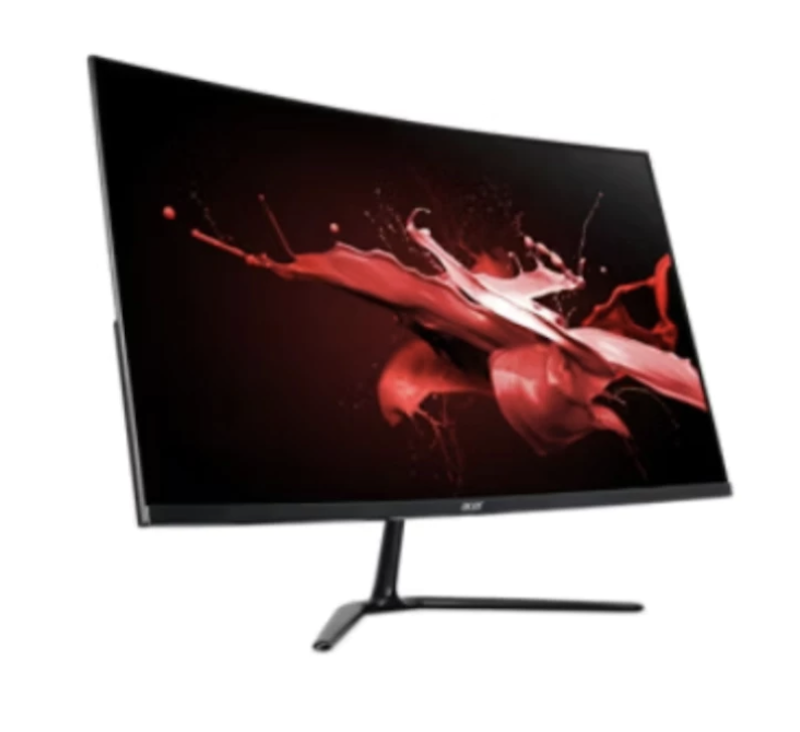
Reviews mention:
Loved for its expansive curved screen, this monitor makes gaming and video content feel more engaging without requiring ultra-high resolutions. Players often note that the 144 Hz refresh rate keeps motion smooth and enhances fast-paced action. The Full HD panel delivers crisp visuals that run well even on mid-range systems. Comfort-oriented features are also appreciated during extended gaming or streaming sessions.
| Curvature | 1500 R |
|---|---|
| Screen Size | 32 in |
| Resolution | FHD |
| Refresh Rate | 144 Hz |
| Color Accuracy | Standard |
| Input Ports | HDMI, DisplayPort |
AOC32 in Curved Gaming Monitor | C32G2ZE2

Reviews mention:
Reliable performance and responsiveness at 250 Hz make this monitor a favorite for fast-paced gaming. The curved VA panel is often noted for enhancing immersion without overwhelming peripheral vision. Users also find the visuals clean and satisfying for both esports and general content. The low 0.5 ms response time is singled out for giving movements a measured feel in shooter and racing games.
| Curvature | 1500 R |
|---|---|
| Screen Size | 32 in |
| Resolution | FHD |
| Refresh Rate | 250 Hz |
| Color Accuracy | High |
| Input Ports | HDMI, DisplayPort |
GamdiasAtlas 27" Curved Gaming Monitor | HD27G II

Reviews mention:
Buyers often highlight how well the 180 Hz refresh rate and quick response time elevate fast-paced gaming. The curved VA panel is praised for adding depth and immersiveness without being overwhelming. Many appreciate the balance of strong performance and clear visuals at a reasonable price point. The straightforward setup and adaptable design suit both gaming rigs and everyday desktop use.
| Curvature | 1500 R |
|---|---|
| Screen Size | 27 in |
| Resolution | FHD |
| Refresh Rate | 180 Hz |
| Color Accuracy | High |
| Input Ports | HDMI, DisplayPort |
Gigabyte27" Curved Gaming Monitor | GS27FC

Reviews mention:
The curved design of this monitor draws players into games and media, making fast-paced action feel more engaging. Its 180 Hz refresh rate ensures smooth motion and crisp visuals during gameplay. Many highlight the balance of color accuracy and responsiveness as impressive for its price. Users also appreciate the easy setup, which works well for both PC and console gaming environments.
| Curvature | 1500 R |
|---|---|
| Screen Size | 27 in |
| Resolution | FHD |
| Refresh Rate | 180 Hz |
| Color Accuracy | High |
| Input Ports | HDMI, DisplayPort |
SamsungOdyssey G6 32" Curved Gaming Monitor | LS32BG652EEXXP

Reviews mention:
Users often say this monitor offers immersive curved visuals and very smooth gaming performance ideal for competitive and fast‑paced games. Others highlight its rich color quality and wide viewing angles. Some reviewers note occasional setup quirks and smart‑feature complexity, but most appreciate how it elevates gameplay enjoyment overall.
| Curvature | 1000 R |
|---|---|
| Screen Size | 32 in |
| Resolution | QHD |
| Refresh Rate | 240 Hz |
| Color Accuracy | Professional |
| Input Ports | HDMI, DisplayPort, USB-C |
Elevate Your PC Setup With Our Recommendations
Upgrading your system should be hassle-free. A good PC setup should make you feel accomplished and fulfilled. Let us help you attain your dream PC setup by clicking on the links below!
Author: Richard Martin
Re-Editor: Roxanne A.


How We Chose and Ranked Our Product Recommendations
Our buying guide was carefully researched and crafted by the mybest team of writers and editors, in collaboration with the expert featured in this article. We used the buying guide as a basis for choosing and ranking the product recommendations, and we looked at reviews and ratings from different E-commerce sites like Lazada, Shopee, and more.
The descriptions of each product are referenced from content available on manufacturer, brand, and e-commerce sites.