Logitech HD Webcam C270 Review: Pros and Cons After Testing
The Logitech C270 HD Webcam is a budget-friendly webcam known for its simple design and reliable performance. Many users say the audio and video quality are more than enough for everyday use, with comments like “clearer than a built-in laptop camera” and “good sound and image quality for the price.”
To see how it really performs, we reviewed the Logitech C270 HD Webcam based on testing across the following seven criteria:
Facial Image Quality
Motion Tracking Performance
Microphone Sound Quality
Field of View
Image Adjustment Features
Privacy Protection
Overall Versatility
We also compared it with popular webcams from other brands, including newer models and current best sellers. Based on hands-on testing, we break down the real pros and cons in detail.

Logitech HD Webcam C270 Test Review

Our recommendation articles are carefully researched and crafted by the mybest Philippines team of writers and editors. To stay true to our company’s mission and vision to help users’ selection process easier, we also collaborate with experts from various fields to ensure that our content stays factual and useful.
Conclusion: Slightly Dark Video, but Clear Audio. A Simple, Budget-Friendly Webcam
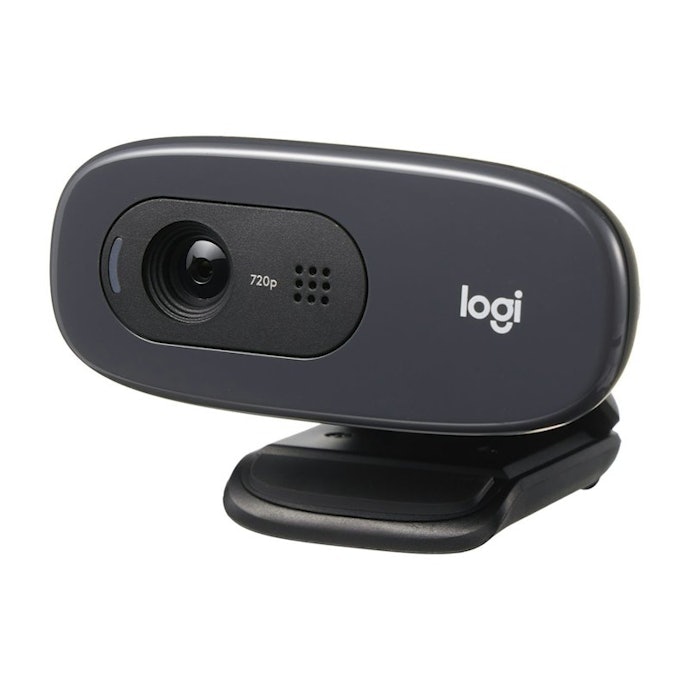
The Logitech C270 HD Webcam is a good choice for users who prioritize affordability and simplicity over advanced features. While many webcams we compared are priced around ₱3,500–₱4,000, this model costs around ₱1,200. It lacks software-based image adjustments and enhanced privacy features, but it delivers the basic webcam functions at a much lower price.
Despite being marketed as offering “sharp and smooth” 720p video, the image quality is only average. Reviewers noted that the face, especially around the eyes, tends to appear dark. Compared with Full HD webcams, the video looked noticeably dimmer, so you may want to consider using supplemental lighting for this webcam.
Motion performance is also limited. At 30fps, it feels less smooth than 60fps webcams, with comments from testers such as “slight lag” and “choppy movement.” The lack of autofocus means brightness and clarity can shift when the subject moves, making the image harder to see at times.
In contrast, microphone quality stands out. Testers described the audio as “clear” with “very little noise,” performing on par with other webcams that offer noise reduction. For online meetings, voice clarity is a definite strength.
The horizontal field of view measures 48 degrees. While narrower than wide-angle webcams, it’s sufficient for solo use. With no support for tripod mounting or desk capture, it’s best suited for standard video calls rather than flexible filming setups.
The Logitech C270 does not include a manual privacy shutter, so users need to remember to turn the camera off after use. If you want a simple, low-cost webcam with good audio quality for everyday online meetings, this model is worth considering.
What Is the Logitech C270 HD Camera?

A webcam is a camera that connects to a computer or similar device to show your face, documents, or surroundings. Compared with built-in laptop cameras, external webcams often deliver a brighter and clearer image, making them a popular choice for online meetings and video calls.
The Logitech C270 introduced here is a webcam from Logitech, a brand known for PC peripherals. It’s an entry-level model that supports HD 720p resolution. Despite its affordable price, it focuses on ease of use, featuring automatic light correction to help improve image visibility and a mono microphone with noise reduction to reduce background noise and keep voices clear.
Adjusts Brightness Based on Lighting Conditions for Sharper, Smoother Video Calls

Designed to deliver sharp, smooth video calls, this webcam supports widescreen and works with major platforms such as Google Meet and Zoom. It’s built for everyday online meetings, keeping setup and operation simple.
The webcam is equipped with RightLight™ 2, which automatically adjusts brightness based on surrounding lighting conditions. This helps produce clearer images with better contrast, even when lighting isn’t ideal.
Key Specifications:
Maximum Resolution: 720p HD
Frame Rate: 30fps
Field of View: 55 degrees (diagonal)
Focus Type: Fixed focus
Connection: USB-A, plug-and-play
Built-in Microphone: Omnidirectional microphone with noise cancellation
Supported OS: Windows 8 or later, macOS 10.10 or later, ChromeOS
Noise Reduction: Yes
Auto Power Off: No
Privacy Shutter: No
Warranty: 2-year limited warranty
Includes a Clip for Flexible Mounting on Screens or Desks
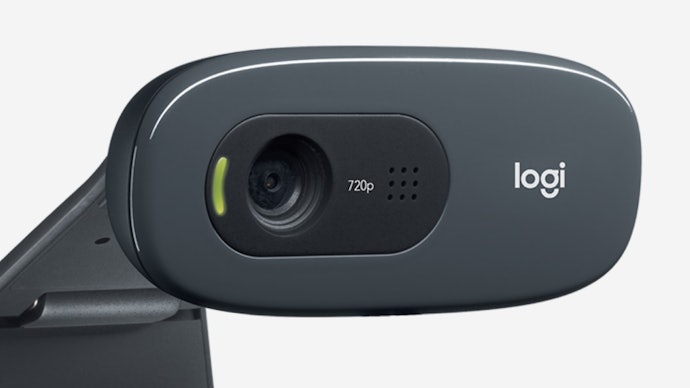
The webcam measures 72.91 × 31.91 × 66.64 mm (height × width × depth, including the fixed mounting clip) and weighs 75 g. It uses a USB-A connection for easy plug-and-play setup.
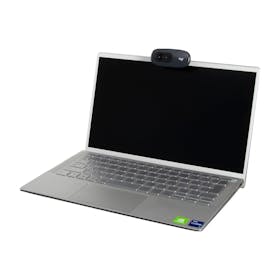
A universal clip is included, allowing the webcam to be securely attached to a monitor or laptop screen. The clip can also be folded, allowing the webcam to be placed directly on a desk or flat surface for added flexibility.
Included Accessories:
1.5 m USB-A cable (attached to the unit)
Warranty card
Warranty information
Logitech C270 HD Webcam Review: Real-World Performance and Limitations After Testing

All product tests
were conducted in-house at mybest

Image Quality Is Dim and Slightly Blurry, Especially Around the Eyes

We first evaluated facial image quality and motion tracking performance.
Ten testers in their 20s to 40s who have experience with remote meetings and online classes participated in this test. They reviewed footage recorded using the webcam in a room without windows and evaluated whether the image appeared bright, facial expressions were easy to read, and movement looked smooth.
Only one out of ten testers felt their face appeared bright. Although Logitech claims automatic light correction, testers often found the video darker than expected, with shadowing around the eyes. Compared with Full HD webcams, the image looked dimmer and less defined, which supports feedback that extra lighting may be needed for clearer video calls.
Facial expressions were generally readable for meetings, but the image often looked soft or slightly blurry, and fine details (like skin texture or close-up text) were hard to make out.
“The area around the eyes looks shadowed and doesn’t always appear clear.”
“My skin tone looked dark.”
“If your face isn’t centered, the screen quickly becomes darker and harder to see.”
“Facial outlines are visible, but the image is dark.”
Tester Comments on Expression Clarity:
“Facial outlines and features are easy to see, so expressions are readable if there’s little movement.”
“Expressions are visible at first, but the image darkens quickly when you move slightly off-center.”
“The low resolution makes expressions look blurry.”
Tester Comments on Detail Visibility:
“The low resolution makes everything look slightly blurry, so details are hard to see.”
“When the subject is close, text is harder to read, and the image becomes darker.”
“Fine texture in skin and hair isn’t well reflected.”
Motion Can Look Choppy, and Brightness Shifts With Movement
Motion performance received mixed feedback, but several testers noted choppiness and slight delay, which is consistent with the 30fps frame rate. Compared with 60fps webcams, movement looked less smooth.
Another repeated issue: brightness changes as the subject moves. Testers noted the image can fluctuate in exposure, making the video harder to watch during movement or when bringing objects closer to the camera.
Tester Comments on Motion Smoothness:
“I felt a delay in movement, which caused some choppiness.”
“It looks like there's motion trail in the feed. There’s no lag, but it’s not smooth.”
“Brightness shifts a bit too much and is hard to watch.”
“Bright backgrounds flicker when someone moves or brings an object close.”
No Autofocus, So Focus Can Struggle When You Move or Show Objects
The Logitech C270 does not have autofocus. Some testers felt focus was slow or that the image stayed slightly blurred, especially when moving forward/back or trying to show something close to the camera (like a card or document).
That said, when the subject stays centered and relatively still, focus was described as clear enough for typical online meetings.
Tester Comments on Focus Performance:
“It takes time to focus and often becomes blurry.”
“It follows side-to-side movement, but struggles with forward and backward movement.”
“Focus is very clear on a centered subject, but has trouble when moving or showing other objects.”
Excellent Microphone Quality With Minimal White Noise and Clear Audio

Next, we evaluated microphone sound quality. As with the video test, ten testers in their 20s to 40s took part. They listened to audio recorded using the webcam’s built-in microphone and assessed how well background noise was reduced and how clearly voices came through.
Most testers gave positive feedback, describing the audio as “clear” and noting that “there’s almost no noise.” In comparison testing, webcams equipped with noise reduction tended to deliver cleaner voice audio, and this model followed that trend. The Logitech C270 uses a mono noise-reduction microphone, and even faint white noise was barely noticeable.
Tester Comments on Noise Reduction:
- “Noise is reduced enough to be easy to hear. It feels usable for meetings in almost any environment.”
- “The audio is very clear with almost no background noise. Lip noise wasn’t noticeable.”
- “Even during silence, there was hardly any noise, so it wasn’t stressful to listen to.”
- “I couldn’t detect white noise or lip noise.”
Testers also rated voice clarity highly, with comments such as “each sound is easy to distinguish” and “the audio is clear without distortion.” A few noted that the sound felt slightly muffled or distant, but not to the point of being hard to understand.
Compared with other webcams that produced mechanical-sounding voices or audio mixed with noise, the C270 performed well. These results support Logitech’s claim that voices remain clear even when speaking from up to 1.5 meters away.
Tester Comments on Voice Clarity:
“From start to finish, there was no distortion. The voice sounded natural and clear.”
“Low tones were easy to distinguish, though higher tones were a bit harder to hear.”
“The voice sounds natural, but slightly quiet, like speaking from a distance.”
“Overall, the audio is clear, smooth, and free from distortion.”
Narrow Field of View. Fine for Solo Use, but Not Ideal for Groups

Next, we evaluated the field of view. We reviewed the field-of-view specifications listed on the official website and packaging, comparing the horizontal width coverage to other models.
According to the official specifications, the diagonal field of view (dFoV) is 55 degrees, which translates to a 48-degree horizontal field of view. This is sufficient for showing one person clearly, but it’s not well-suited for capturing multiple people or a full meeting room.
If you need to show a wider space or include several people in the frame, it’s better to look for a webcam with a horizontal field of view of 90 degrees or more.
A Basic Webcam With No Extra Features or Accessories

Lastly, we evaluated image adjustment options, privacy features, and overall versatility.
Testers checked the webcam hands-on to see whether it offers brightness or contrast controls, privacy protection features, or added functions such as tripod support. The focus was on whether it provides anything beyond basic webcam functionality.
No Dedicated Software or App for Image Adjustments

There is no dedicated software or app for adjusting image settings such as brightness or contrast. While some webcams we compared allow detailed image tuning through proprietary software, this model relies solely on automatic light correction during recording.
As a result, users who want to fine-tune image quality to match their preferences may find the feature set limited.
Available Image Adjustment Options:
Brightness (Luminance): No
Contrast: No
Saturation: No
Sharpness: No
Color Temperature: No
White Balance: No
Manual Focus Adjustment: No
Field of View Adjustment: No
No Privacy Protection Features

This webcam does not include any built-in privacy protection features.
It does not have a privacy shutter or an automatic lens adjustment feature when the power is turned off. This aligns with user feedback: “I wish it had a manual shutter.” Overall, this model prioritizes a simple, no-frills design rather than enhanced privacy features.
Privacy Features:
Privacy Shutter: No
Automatic Lens Adjustment When Powered Off: No
No Extra Features Such as Desk View or Tripod Mounting

Usage is limited to two setup options: clipping the webcam onto a monitor or laptop, or placing it on a flat surface such as a shelf.
Some webcams we compared can capture desk views, be mounted on a tripod, or offer features like gesture control and focus tracking. The Logitech C270 does not include these functions and keeps its design intentionally simple. If you want more flexibility or advanced features, other models may be a better fit.
Additional Features:
Desk View Support: No
Tripod Included: No
Gesture Control: No
Focus Tracking: No
Logitech HD Webcam C270 Product Details
- HD 720p resolution at 30fps delivers smooth, crisp video for reliable calls
- Automatic light correction adjusts to room lighting for natural, vibrant colors
- Built-in noise-reducing mic picks up clear voice from a distance
- Universal clip mount fits laptops, monitors, or tripods for easy setup
Reviews mention:
Local reviewers appreciate the webcam's simple, plug-and-play setup, sturdy build, and clear mic that works well for both online classes and remote work. They find it amazing that their laptop's built-in cameras get outperformed by this device, but at the fraction of the cost of similar products in the market. However, some users find the narrow field of view too cropped, preferring wider angles for showing more background.
| Resolution | 720p |
|---|---|
| Frame Rate | 30 FPS |
| Field of View | 60 Degrees |
| Installation Type | Clip-On |
| Operating System Compatibility | Windows, macOS, ChromeOS |
| Built-in Microphone | |
| Built-in Ring Light | |
| Additional Features | Auto Light Correction |
Where Can You Buy the Logitech C270 HD Webcam in the Philippines?

The Logitech C270 HD Webcam is available in the Philippines through major online marketplaces.
It is commonly sold on platforms such as Shopee and Lazada, with prices typically ranging from around ₱1,100 to ₱1,300, depending on the seller and ongoing promotions.
Availability may vary by store, so if you have a preferred shopping platform or want to use vouchers and cashback offers, it’s worth checking multiple listings before purchasing.
Check Out More From Logitech
Logitech has more webcams and other accessories for your computers and laptops. Take a look at more of our recommendations to find your computer companions.

| Resolution | 1080p |
|---|---|
| Frame Rate | 30 FPS |
| Field of View | 70 Degrees |
| Installation Type | Clip-On |
| Operating System Compatibility | Windows, macOS, ChromeOS |
| Built-in Microphone | |
| Built-in Ring Light | |
| Additional Features | Integrated Privacy Shutter, Anti-Reflective Coating |