


10 Best Laptops for AutoCAD in the Philippines 2026 | Lenovo, Gigabyte, and More
AutoCAD is a program that requires a laptop capable of handling rendering, designing, and saving large files. Investing in a laptop that can run AutoCAD smoothly is especially important if you use it alongside other design software. Whether you’re a student learning drafting or an architect or engineer working on professional projects, you need a laptop that can keep up with AutoCAD’s demands.
In this article, we’ll explain what you need to know about laptops for AutoCAD and their key specifications through our buying guide. To help you narrow down your choices, we’ve also listed some of the best laptops for AutoCAD, available on e-commerce sites like Shopee and Lazada.

Patricia is a versatile writer with an interest in food, lifestyle, travel, and sports. She also writes articles and does social media work as a volunteer of a media organization that covers collegiate sports leagues in the Philippines. During her free time, she enjoys binge-watching her favorite shows, attending sporting events, and sometimes, traveling.
Why You Can Trust Us
Every mybest article is crafted with hours of in-depth research and interviews with experts. Each month, we are continually expanding our database of products based on our research. By emphasizing user insight and reliable information, we deliver trustworthy content to readers.
What Makes a Laptop Suitable for AutoCAD Compared to a Regular Laptop?

AutoCAD places heavier demands on a laptop than typical office or school applications. While regular laptops can handle tasks like web browsing, document editing, and streaming, CAD software requires significantly more processing power to display complex drawings and 3D models smoothly. Without adequate hardware, users may experience slow viewport navigation, lag when editing large files, or rendering crashes.
As a result, laptops designed for AutoCAD typically feature stronger processors, dedicated graphics cards, and higher memory capacity. These components help maintain smooth performance when working with detailed models, large project files, and multiple design layers for extended periods.
How to Choose a Laptop for AutoCAD - Buying Guide
Choose an Intel Core i7/i9 or Ryzen 7/9 for Smooth and Responsive CAD Performance

High-performance CPUs like Intel Core i7/i9 or Ryzen 7/9 are recommended for running AutoCAD because their fast speeds and multiple cores allow laptops to handle complex calculations, large 2D and 3D files, and detailed models smoothly with minimal lag.
Intel Core i7 and i9 processors perform well when opening large files and running AutoCAD alongside Windows and other software, while Ryzen 7 and 9 processors often have more cores, making them especially good for multitasking and working with very large or complex 3D models.
Select a Graphics Card That Matches Your 2D or 3D AutoCAD Workload
Before choosing a graphics card, it’s important to know the type of AutoCAD projects you’ll be working on. This ensures you choose one that matches your 2D or 3D workload.
For 2D Drafting: GTX 1650 or RTX 3050 Is Sufficient for Drafting and Simple Designs

If you mostly work on 2D drafting and simple models on AutoCAD, a GPU of either GTX 1650 or RTX 3050 is already enough. Simpler designs mostly involve lines, layers, and basic shapes, so they do not require very powerful graphics processing. These GPUs still offer enough memory and processing cores to display and render drawings smoothly, and are also more affordable, making them a practical and accessible starting point.
For 3D Modeling: RTX 3060/4060 Delivers Smoother Viewports and Faster Rendering

The RTX 3060 and 4060 GPUs can process detailed 3D designs and keep the viewport smooth when rotating or editing. They also have dedicated RT cores for faster ray-traced rendering and GDDR6 memory that helps handle large model files more efficiently. These features allow designers to model, preview, and render 3D projects more quickly and with fewer slowdowns.
For Professional Workflows: RTX A2000/A3000 Workstation GPUs Provide Stability

Look for Sufficient RAM and Fast NVMe SSD for Smooth AutoCAD Performance
Higher RAM Capacity Ensures Smooth Operation with Large AutoCAD Files

- 16 GB - This amount of RAM is suitable for basic 2D drawings and small 3D models, making it a good choice for students or professionals working on less complex projects.
- 32 GB - For larger project files and more detailed 3D models containing multiple layers, this RAM is enough to run other programs simultaneously.
- 64 GB - If you frequently create large and complex models, 64GB of RAM can handle heavy rendering, detailed simulations, and extremely large files without lag. This makes it ideal for professionals working on high-end and demanding design projects.
Generally, the higher the RAM, the better. However, it ultimately depends on your work needs whether the 16 GB, 32 GB, or 64 GB is sufficient.
512GB–1TB NVMe SSD Reduces Load Times and Speeds Up Project Saving

Having a 512GB to 1TB NVMe SSD in your laptop for AutoCAD is a great choice, as this type of storage is much faster than a regular hard drive. It can load, render, and save large files and detailed 3D models more quickly. The extra storage space also gives you room to keep project files, download software updates, and design resources without slowing down your laptop.
Upgrading to 1TB may be more expensive, but it is worth it for users who work with many large AutoCAD files, complex 3D models, or multiple design programs at the same time, such as architecture or engineering students and professionals. For students or those with lighter workloads, 512GB may already be sufficient.
Opt for a 15.6-Inch Display With at Least Full HD Resolution for Detailed Drafting

Going for a laptop with a 15.6-inch display for AutoCAD provides enough screen space to view multiple toolbars, panels, and detailed drawings without constantly zooming or scrolling. A resolution of at least Full HD ensures that lines, text, and small design elements remain crisp and distinguishable, which is critical for precision drafting.
On the other hand, smaller screens or lower resolutions can make complex models harder to read, increasing the risk of mistakes and eye strain during long design sessions. Overall, a 15.6-inch Full HD display strikes the right balance between clarity and workspace, allowing you to work efficiently and accurately on CAD projects.
Check Cooling Efficiency and Build Quality for Reliable Operation

For reliable AutoCAD performance, it’s essential to choose a laptop with an efficient cooling system, ideally dual fans or a vapor chamber, to prevent overheating during intensive 3D modeling and rendering. Moreover, laptops with optimized airflow channels and heat-dissipation vents help maintain consistent performance even during prolonged use, avoiding thermal throttling that can slow down complex projects.
You can assess a laptop’s build quality by looking for features like sturdy hinges and a solid chassis, as well as details like keyboard stability and port durability, as these reflect how well the laptop can handle long-term use. Laptops with thermal management features or structural reinforcements in their specs are generally more reliable for demanding CAD workloads.
10 Best Laptops for AutoCAD to Buy Online
| Products | Image | Click to purchase | Popularity | Details | ||||||
|---|---|---|---|---|---|---|---|---|---|---|
Processor | Graphics Card | RAM | Storage | Display | Cooling Efficiency | |||||
1 | Legion 15IRX10|83LY00EWPH | 16 GB RAM, 512 GB + 1 TB SSD Lenovo |  | No.1 | Intel Core i7-13650HX | NVIDIA GeForce RTX™ 5050 8 GB GDDR7 | 16 GB DDR5 | 512 GB + 1 TB SSD | IPS WUXGA Panel | Dual-Fan, Vapor Chamber | |
2 | Gaming A16|CTHI3PH893SH | 16 GB RAM, 512 GB + 1 TB SSD GIGABYTE |  | No.2 | Intel Core i7-13620H | NVIDIA GeForce RTX™ 5050 8 GB GDDR7 | 16 GB DDR5 | 512 GB + 1TB SSD | WUXGA IPS | Dual-Fan | |
3 | GT Book Infinix |  | No.3 | Intel Core i5-13420H | NVIDIA GeForce RTX™ 4050 | 16 GB | 512 GB | IPS | Dual-Fan | |
4 | TUF Gaming A16|FA607NUG- RL116W | 16 GB DDR5 512 GB SSD Asus |  | No.4 | AMD Ryzen 7 7445HS | NVIDIA GeForce RTX™ 4050 6 GB GDDR6 | 16 GB DDR5 | 512 GB SSD | IPS WUXGA Panel | Dual-Fan | |
5 | Thin 15|B12UC-1432PH MSI |  | No.5 | Intel Core i7-12650H | NVIDIA GeForce RTX™ 3050 4 GB GDDR6 | 16 GB DDR4 | 512 GB SSD | FHD IPS | unknown | |
6 | Victus 15-FB3133AX|16 GB DDR5 RAM + 512 GB SSD HP |  | No.6 | AMD Ryzen™ 7 7445H | NVIDIA GeForce RTX™ 4050 6 GB GDDR6 | 16 GB DDR5 | 512 GB SSD | FHD IPS | unknown | |
7 | Gaming A16-CMHI2PH893SH|32 GB DDR5 RAM + 512 GB + 512 GB SSD GIGABYTE |  | No.7 | Intel Core i7-13620H | NVIDIA® GeForce RTX™ 4050 6 GB GDDR6 | 32 GB DDR5 | 512 GB + 512 GB SSD | WUXGA | Dual-Fan | |
8 | Lenovo LOQ|83S0000YPH | 16 GB DDR5 RAM + 512 GB SSD Lenovo |  | No.8 | AMD Ryzen™ 7 7735HS | NVIDIA GeForce RTX 4050 6 GB GDDR6 | 16 GB DDR5 | 512 GB SSD | FHD IPS | Dual-Fan | |
9 | Cyborg 15|B13WFKG-642PH | 32 GB (2x16) DDR5 RAM + 1 TB SSD MSI |  | No.9 | Intel Core i5-13420H | NVIDIA GeForce RTX™ 5060 8 GB GDDR7 | 16 GB | 1 TB | FHD IPS | CPU-GPU Shared-Pipe Design | |
10 | STAR15|32 GB DDR4 RAM + 512 GB SSD Machenike |  | No.10 | Intel Core i7-13620H | NVIDIA GeForce RTX3050 4 GB GDDR6 | 32 GB DDR4 | 512 GB SSD | FHD IPS | unknown | |

LenovoLegion 15IRX10 | 83LY00EWPH | 16 GB RAM, 512 GB + 1 TB SSD

Reviews mention:
Buyers highlight its effective cooling, keeping the laptop running smoothly under heavy use. Some point out the 512 GB SSD is small and may need upgrading for larger workloads or media. They also appreciate the sleek, professional design, making it look like a high-end laptop.
| Processor | Intel Core i7-13650HX |
|---|---|
| Graphics Card | NVIDIA GeForce RTX™ 5050 8 GB GDDR7 |
| RAM | 16 GB DDR5 |
| Storage | 512 GB + 1 TB SSD |
| Display | IPS WUXGA Panel |
| Cooling Efficiency | Dual-Fan, Vapor Chamber |
GIGABYTEGaming A16 | CTHI3PH893SH | 16 GB RAM, 512 GB + 1 TB SSD
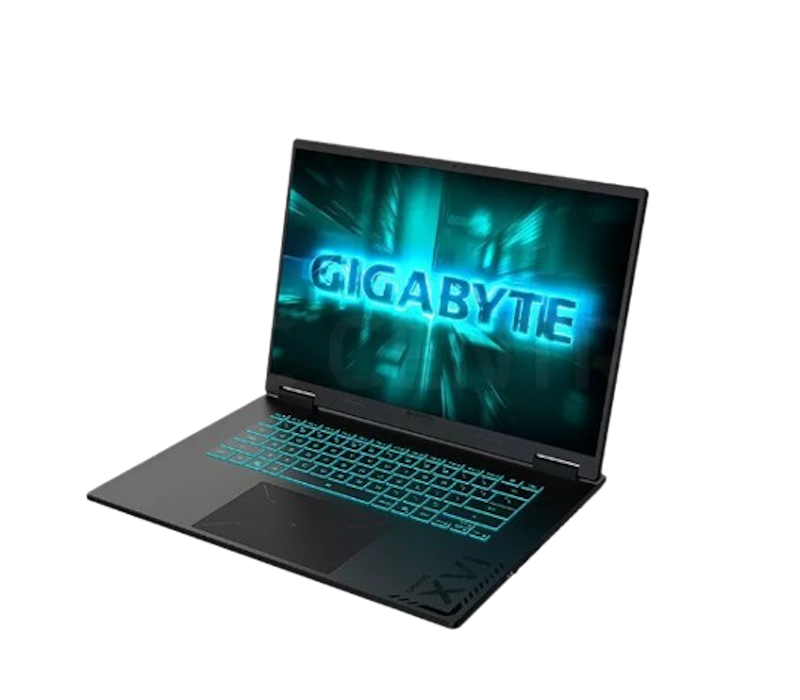
Customers praise the strong performance for its price, along with its slim design and effective cooling. Some mention a minor issue where the GiMATE app needed to be reinstalled from the Gigabyte website. Overall, they find it reliable for both work and gaming.
| Processor | Intel Core i7-13620H |
|---|---|
| Graphics Card | NVIDIA GeForce RTX™ 5050 8 GB GDDR7 |
| RAM | 16 GB DDR5 |
| Storage | 512 GB + 1TB SSD |
| Display | WUXGA IPS |
| Cooling Efficiency | Dual-Fan |

Reviews mention:
Many highlight the 16-inch IPS display's vibrant 100% sRGB coverage and 120 Hz refresh rate. People appreciate the solid build quality and lightweight design. Several praise its impressive performance, how it supports smooth gaming and multitasking without lag.
| Processor | Intel Core i5-13420H |
|---|---|
| Graphics Card | NVIDIA GeForce RTX™ 4050 |
| RAM | 16 GB |
| Storage | 512 GB |
| Display | IPS |
| Cooling Efficiency | Dual-Fan |
AsusTUF Gaming A16 | FA607NUG- RL116W | 16 GB DDR5 512 GB SSD

Reviews mention:
Shoppers find this laptop performs well for 1080p–1200p gaming at high settings. They note the cooling is effective but noisy in Turbo mode. Many appreciate its manageable weight for a 16-inch laptop, with the display performing best in fast-paced games.
| Processor | AMD Ryzen 7 7445HS |
|---|---|
| Graphics Card | NVIDIA GeForce RTX™ 4050 6 GB GDDR6 |
| RAM | 16 GB DDR5 |
| Storage | 512 GB SSD |
| Display | IPS WUXGA Panel |
| Cooling Efficiency | Dual-Fan |

Reviews mention:
Buyers praise the laptop for its high-quality build and reliable components. They find performance solid for everyday tasks and capable of running games smoothly, though battery life is average. Many also highlight its value for the price and well-rounded features.
| Processor | Intel Core i7-12650H |
|---|---|
| Graphics Card | NVIDIA GeForce RTX™ 3050 4 GB GDDR6 |
| RAM | 16 GB DDR4 |
| Storage | 512 GB SSD |
| Display | FHD IPS |
| Cooling Efficiency | unknown |
HPVictus 15-FB3133AX | 16 GB DDR5 RAM + 512 GB SSD

Reviews mention:
Customers consider this laptop well-suited for 1080p entry- to mid-range gaming. They find it reasonably portable despite the 2.29 kg weight and bulky power adapter. Many note the build feels a bit “budget,” but they appreciate that the RAM and SSD can be easily upgraded.
| Processor | AMD Ryzen™ 7 7445H |
|---|---|
| Graphics Card | NVIDIA GeForce RTX™ 4050 6 GB GDDR6 |
| RAM | 16 GB DDR5 |
| Storage | 512 GB SSD |
| Display | FHD IPS |
| Cooling Efficiency | unknown |
GIGABYTEGaming A16-CMHI2PH893SH | 32 GB DDR5 RAM + 512 GB + 512 GB SSD

Reviews mention:
Reviewers share that the laptop’s high specs deliver smooth performance for gaming and browsing. They note its affordability and solid quality, though some say games like Hogwarts Mystery run best on medium to low settings, which is acceptable for the price.
| Processor | Intel Core i7-13620H |
|---|---|
| Graphics Card | NVIDIA® GeForce RTX™ 4050 6 GB GDDR6 |
| RAM | 32 GB DDR5 |
| Storage | 512 GB + 512 GB SSD |
| Display | WUXGA |
| Cooling Efficiency | Dual-Fan |
LenovoLenovo LOQ | 83S0000YPH | 16 GB DDR5 RAM + 512 GB SSD

Reviews mention:
Users like that the laptop handles 1080p gaming smoothly with DLSS 3.5. Many find the display bright and colorful, while some highlight the keyboard’s comfortable typing experience. Most appreciate the solid, durable chassis that gives a “stealthy” feel.
| Processor | AMD Ryzen™ 7 7735HS |
|---|---|
| Graphics Card | NVIDIA GeForce RTX 4050 6 GB GDDR6 |
| RAM | 16 GB DDR5 |
| Storage | 512 GB SSD |
| Display | FHD IPS |
| Cooling Efficiency | Dual-Fan |
MSICyborg 15 | B13WFKG-642PH | 32 GB (2x16) DDR5 RAM + 1 TB SSD

Reviews mention:
Shoppers say the laptop handles 1080p gaming at high settings and has a lightweight, thin design with a translucent “mech” look. They note upgrade options are limited with only one SSD slot, but the 55.2 Wh battery still provides 3–4 hours of use for non-gaming tasks.
| Processor | Intel Core i5-13420H |
|---|---|
| Graphics Card | NVIDIA GeForce RTX™ 5060 8 GB GDDR7 |
| RAM | 16 GB |
| Storage | 1 TB |
| Display | FHD IPS |
| Cooling Efficiency | CPU-GPU Shared-Pipe Design |
Machenike STAR15 | 32 GB DDR4 RAM + 512 GB SSD

Reviews mention:
Reviewers note the laptop handles productivity well with its i7 processor and 16 GB RAM. They say gaming is best suited for entry-level play because of the 4 GB VRAM, and the lightweight plastic design requires careful handling. Many also appreciate the easy upgrade options.
| Processor | Intel Core i7-13620H |
|---|---|
| Graphics Card | NVIDIA GeForce RTX3050 4 GB GDDR6 |
| RAM | 32 GB DDR4 |
| Storage | 512 GB SSD |
| Display | FHD IPS |
| Cooling Efficiency | unknown |
Frequently Asked Questions
Below are some of the most asked questions on the web answered by the mybest team.
How Should I Properly Maintain a Laptop for AutoCAD?
To maintain a laptop for AutoCAD, make sure that the system, AutoCAD, and graphics drivers are up to date for stable performance. Ensure the SSD has ample free space and back up your files regularly to prevent slowdowns and data loss. Clean vents and use a cooling pad to avoid overheating during heavy drafting or 3D work. Additionally, use reliable antivirus software and handle the laptop with care to protect your system and CAD files.
Is a MacBook Suitable for AutoCAD?
Yes, a MacBook can run AutoCAD, especially newer Apple Silicon models, which offer strong, smooth CPU and GPU performance suitable for 2D drafting and basic 3D work. However, the Mac version includes fewer specialized toolsets and plugins than Windows, which can limit advanced 3D and industry-specific workflows.
How Can I Prevent File Corruption When Using AutoCAD?
To prevent file corruption in AutoCAD, enable autosave and backup (.bak) files, and use incremental versions instead of overwriting the same drawing. Regularly run PURGE, AUDIT, and RECOVER to maintain file health. Always work from your local drive rather than USB or cloud-synced folders, and keep your software and graphics drivers updated through Autodesk.
Make Your Work Station Comfortable With These Items
Working on projects in AutoCAD often means long hours spent creating models from simple to complex. To stay comfortable during extended work sessions consider a laptop stand, an ergonomic mouse, and anti–blue–light glasses.


How We Chose and Ranked Our Product Recommendations
Our buying guide was carefully researched and crafted by the mybest team of writers and editors. We used the buying guide as a basis for choosing and ranking the product recommendations, and we looked at reviews and ratings from different E-commerce sites like Lazada, Shopee, and more.
The descriptions of each product are referenced from content available on manufacturer, brand, and e-commerce sites.