We Tested the Anker MagGo 3-in-1 Wireless Charging Station With Three Apple Devices at Once
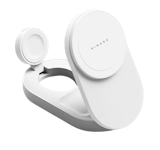
Anker MagGo Wireless Charging Station (model A25M4) is a 3-in-1 dock stand made for supported Apple devices: iPhone 12–17 series, Apple Watch, and AirPods or TWS earbuds with a wireless charging case. It sounds like the kind of desk upgrade that can finally clean up your cables, especially if you already use the Apple ecosystem every day.
But does your phone actually charge properly when all three are on it at once? How much battery do you get in 30 minutes? And will the magnet really hold? We ran the same charging test twice, once with the phone alone and once with everything docked, to find out. We also brought in IT professional and tech reviewer Josiah Mark Castor (JosiahDoesTech) to weigh in on the technical side, from Qi2 charging standards to battery health, so you're getting both our hands-on results and his expert take throughout this review.
Anker MagGo Wireless Charging Station (3-in-1, Dock Stand) Test Review

Issa has been part of mybest since 2020. She's an impulsive buyer at heart who still asks sulit ba talaga before believing the hype.

Josiah Mark Castor, known online as JosiahDoesTech, is a Filipino tech creator, reviewer, and IT professional who combines his passion for technology, programming, and digital innovation to make tech more accessible, practical, and engaging for everyday Filipinos.
TL;DR: Reliable 3-in-1 Charger, but Not Sulit if You Only Charge One Device
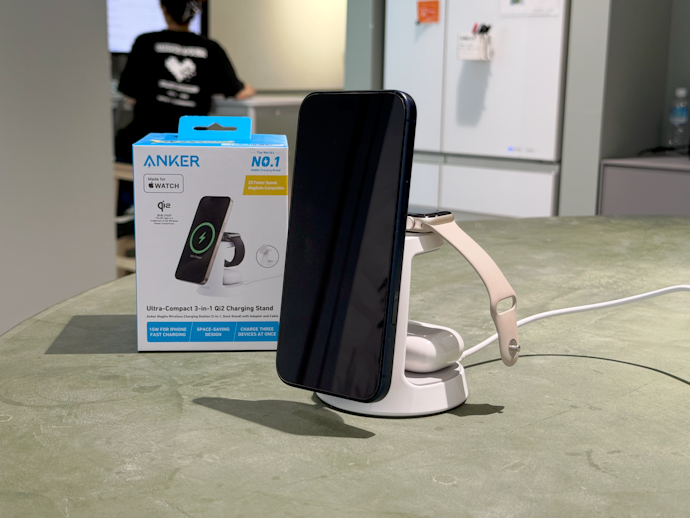
As a 3-in-1 charging station, Anker MagGo mostly delivers. In our 30-minute test, the iPhone charged from 20% to 63% when docked alone. With the iPhone, Apple Watch, and AirPods docked at the same time, the phone still reached 58%. That is only a 5-point difference, so the 3-in-1 claim holds up better than expected for everyday charging.
- The good: easy setup, plug included, charges all three devices right away, strong magnetic hold, and a clean one-outlet setup for iPhone + Apple Watch + AirPods users.
- The catch: this is not a universal wireless charger. It is not for Android phones or smartwatches, only supports MagSafe-compatible phone cases, and AirPods or TWS earbuds need a wireless charging case. One-handed docking also takes some practice.
Our honest opinion:
Get it if you charge an iPhone, Apple Watch, and AirPods and want one clean charging setup. Skip it if you only charge a phone, or if you would not actually use all three spots.
This review is based on our own hands-on testing of a unit from mybest's stock. Compatibility and specification details are attributed to Anker and were not independently verified. This review is independent of brand sponsorship and paid placement.
How We Tested the Anker MagGo Wireless Charging Station (3-in-1, Dock Stand; model A25M4)
All product tests
were conducted in-house at mybest

Tested by Ted (mybest PH team), using an iPhone 15 with a clear silicone MagSafe case, an Apple Watch Series 4, and AirPods Pro (1st generation). The A25M4 unit was set up with the included USB-C cable and wall plug, then used as a desk-style charger for everyday docking in an air-conditioned office.
We ran a 30-minute charging test from 20% battery, with airplane mode on and the screen off. Battery level was recorded at 0, 10, 20, and 30 minutes. We tested it two ways: phone only, then phone + Apple Watch + AirPods together.
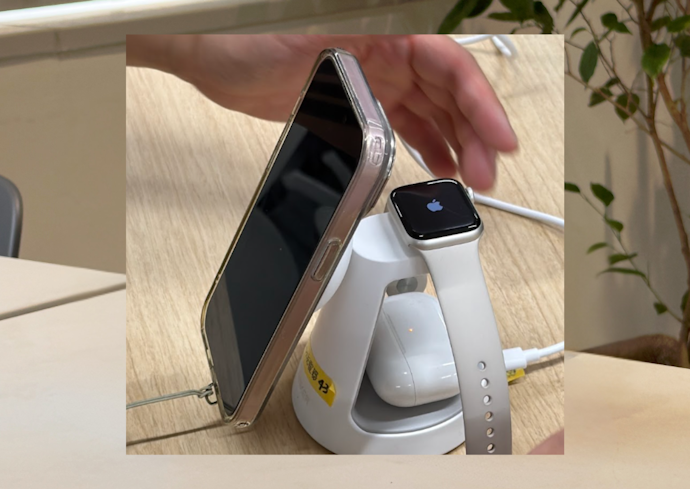
We also checked magnetic hold with no case and with a regular clear silicone case, tried one-handed docking, and touched the phone after charging to check warmth. This was not a lab temperature test.
Anker's main claims for this model are 15W fast charging, three devices at once, MFW-certified Apple Watch charging, and an adjustable angle. Here's what we checked:
- All-device charging: does the iPhone slow down when the Watch and AirPods are docked too?
- Charging speed: how much does the iPhone gain in 30 minutes?
- Magnetic hold: does the phone attach securely, with and without a case?
Does the iPhone Charge Slower With Everything Docked? Yes, but Only by 5 Points
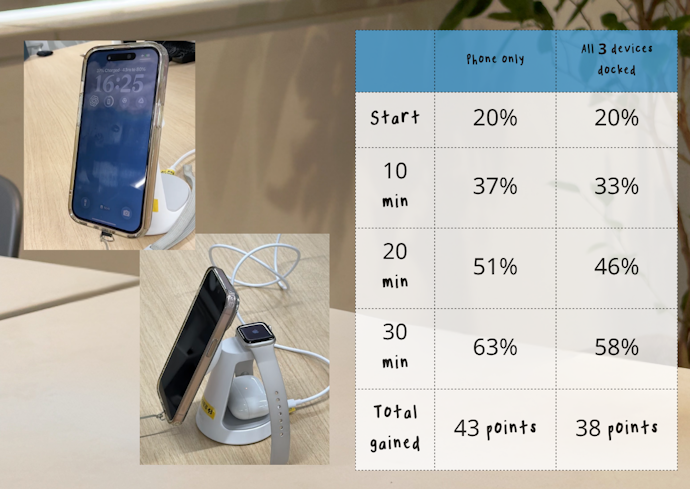
Note: the battery display jumped from 20% to 26% right after docking, so we treat the 30-minute figure as the reliable one.
The important question is simple: will your iPhone charge slower if your Apple Watch and AirPods are charging too?
In our test, yes, but only by a little. The iPhone reached 58% with all three devices docked. When it was charging alone, it reached 63%. That is a 5-point difference after 30 minutes.
The slowdown showed up early, then stayed small. It did not keep getting worse as the devices charged. So the practical answer is this: the iPhone still charged fast, but it charged a little faster when it was alone. For daily charging, this is not a dealbreaker. If you dock everything before a meeting, your iPhone still gets a useful top-up.

It’s totally normal for the iPhone to charge a little slower when all three devices are docked at the same time. The station is rated for up to 15W for the iPhone, 5W for Apple Watch, and 5W for earbuds, so charging performance can vary depending on which devices are connected
But really, if you're just leaving it on your desk while working or on your nightstand overnight, that small drop in speed doesn't matter much. The convenience of waking up to three fully charged devices is definitely worth the small trade-off.
Charging Speed: iPhone Went From 20% to 63% in 30 Minutes
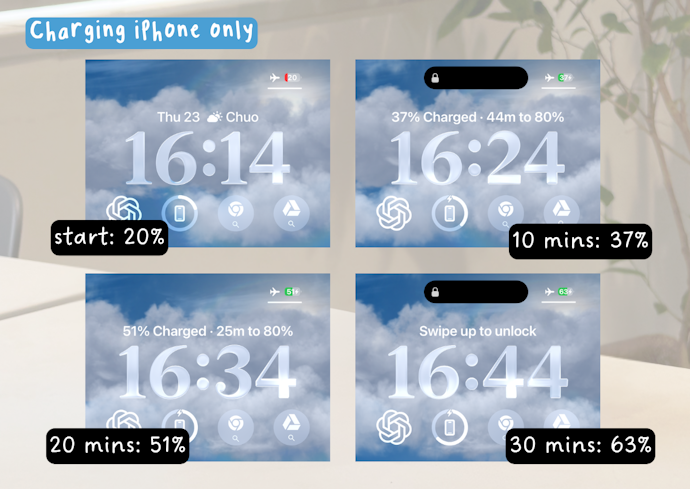
Wireless charging has a reputation for being slow, so speed was one of our biggest concerns going into this test. We wanted to know whether 30 minutes on the stand could save a low bat phone.
Short answer: yes. The iPhone went from 20% to 63% in 30 minutes when it was charging alone. After the 30-minute result, charging speed no longer felt like the main drawback.
One thing we'd like to note, though: we did not run a wired cable under the same test, so we cannot say whether this is faster or slower than plugging in. We can only say that it did not feel slow in daily use.
If we compare wired and wireless charging, the main differences are usually speed, efficiency, and convenience. A compatible wired charger will often charge a phone faster and may produce less heat than wireless charging, while wireless charging can be more convenient for everyday desk or bedside use.
Personally, I don't look at it as a 'wireless versus wired' competition. I use wireless charging when I prioritize convenience. It's for times I don't want messy wires everywhere on my desk, or I just want an easy-access station where I can grab my phone, use it, and snap it right back to keep charging.
Will Your Phone Fall Off? No, Not Even When We Shook It
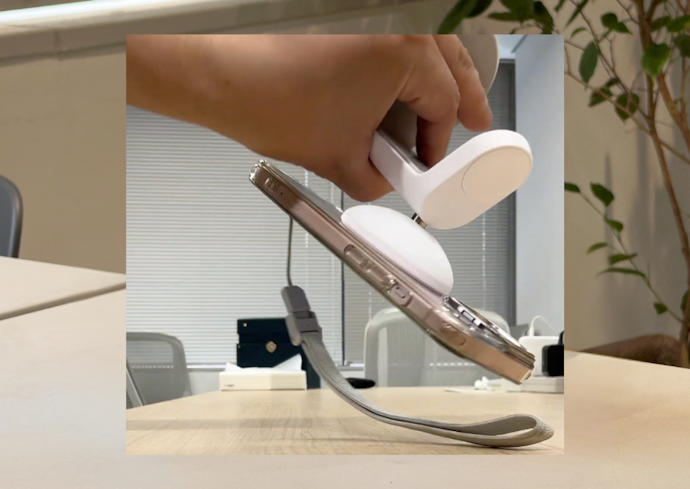
Holding Power: Secure Even Upside Down
We snapped the phone on, turned the whole stand over, and shook it. Nothing moved.
This was the biggest surprise of the test. The grip was strong enough that we stopped thinking about it entirely after the first day. So if your worry is a cheap dock dropping your phone after a desk bump, that is not this one.
You don't need to worry about the magnets weakening over time. Magnets only lose their grip under very extreme temperatures, which a phone will never reach. The mild warmth your phone gets while charging is completely safe and won't degrade the magnetic hold at all, even after months of daily snapping and pulling.
Charging With a Case: Works With Thin, MagSafe Ones
We tested it with no case and with a MagSafe clear case. We did not notice any difference, and the hold was just as strong for both.
For best magnetic attachment and charging efficiency, use a thin MagSafe-compatible or magnetic case. Anker warns that cases thicker than 2.5 mm and non-magnetic cases may reduce charging efficiency. Remove wallets, cardholders, metal accessories, or other objects between the phone and charger
If you're using a MagSafe wallet or a cardholder with metal in it, charging might not work at all, not just slower, since the metal blocks the coil from lining up properly. Best to have direct contact with the charging surface, ideally a MagSafe-compatible case, nothing metal in between.
One-Handed Docking: Takes Practice
The hold is strong once the phone is attached, but getting it into the right spot could take a few tries, which was the case for us. The magnet only catches properly in one area on the back of the iPhone, so you may need to shift the phone slightly until it clicks into place.
The strong magnets are actually a feature here, not just a quirk. Once the phone snaps into the right spot, you know immediately that it's charging instead of wondering if it's aligned properly, which is a common frustration with older, non-MagSafe wireless chargers.
Does the Phone Get Hot? Warm, but Not Hot
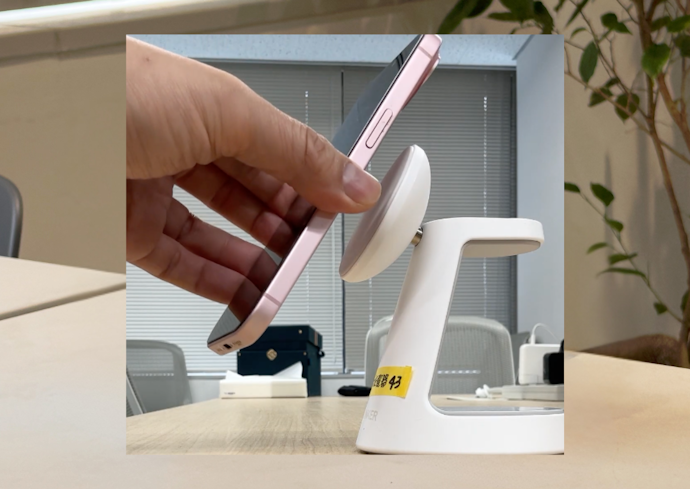
We touched the back of the phone, case on, right after a full 30-minute round. It was noticeably warm, but nowhere near the heat of a phone left out in the sun.
Some warmth is normal for wireless charging. Anker credits a system that monitors temperature continuously and cites compliance with international safety standards, though that is their claim and not something we verified.
To be clear about the test: a touch check on a desk in an air-conditioned office, not a lab measurement. We did not test it overnight, and we make no claims about long-term battery health.
It's completely normal for the phone to feel warm during wireless charging because electricity is passing through the surface. As long as you're using a quality charger in a normal room environment, that mild warmth won't ruin your battery.
iOS uses Optimized Battery Charging overnight, which prevents the phone from drawing continuous peak power once it reaches 80, protecting your battery's life span.
Who Should Get It and Who Should Skip It
Get this if:
- You use a supported iPhone, Apple Watch, and AirPods daily
- You want one clean charging station instead of multiple cables
- You only have one convenient outlet on your desk or bedside table
- You care about convenience more than maximum charging speed
- You want a magnetic charger with a secure hold
- You want a 3-in-1 setup that still charges the phone well when all devices are docked
Skip it if:
- You only need to charge an iPhone
- You do not own an Apple Watch or AirPods
- You want the cheapest possible charger
- You need the absolute fastest charging speed
- You use an Android phone, Samsung Galaxy phone, or Android smartwatch
- You use a Samsung Galaxy Watch
- You use a non-MagSafe-compatible or very thick phone case
- Your AirPods or earbuds case does not support wireless charging
- You prefer plugging in a cable and do not mind the clutter
Spending a bit more on a trusted brand, like Anker, with certified Qi2 technology, is worth it over cheaper alternatives. Certification guarantees proper power delivery, thermal management to prevent overheating, and accurate magnetic alignment.
With cheap chargers, poor alignment can waste energy, build up heat, and eventually cost you more in repairs if your device breaks down.
FAQ
Thinking of getting the Anker MagGo? We answer some common questions below.
What's Included in the Box?
The Anker MagGo Wireless Charging Station, a 40W USB PD charger, a 1.5m USB-C to USB-C cable, an instruction manual, warranty coverage, and customer support. The included adapter matters because some chargers do not include one. Anker recommends at least 36W PD if you use your own.
Is the Anker MagGo Wireless Charging Station Worth It?
It is worth considering if you regularly charge a supported iPhone, Apple Watch, and AirPods or wireless-charging earbuds. If you only charge one iPhone, a cable is probably enough.
Can Samsung Users Use the Anker MagGo Wireless Charging Station?
No. According to Anker, this wireless charger is not compatible with Android phones or smartwatches. Samsung phone and Galaxy Watch users should choose a charger made for Galaxy devices instead.
Does the iPhone Charge Slower When All Three Devices Are Docked?
A little, but not by much, in our test. The phone gained 43 points when charged alone and 38 points when all three devices were docked, a 5-point difference.
If you ever swap the included adapter for something with lower wattage, expect it to charge slower. That's normal, not a sign anything's wrong. Going higher wattage is fine too, the phone only pulls what it actually needs
Do All iPhones Work With the Anker MagGo?
According to Anker, the iPhone 12 through 17 series, running iOS 17.4 or later. The iPhone 16e is specifically excluded, so check your exact model.
Older iPhones, 11 and below, can still do wireless charging, they've had that since the iPhone 8. What they don't have is MagSafe, the magnetic alignment Apple introduced with the iPhone 12. Without those magnets, the phone won't snap into place or line up with the coil properly, so it's not built to work with this kind of dock.
Will All AirPods Work?
Only if the case charges wirelessly. Anker lists AirPods 2, 3, 4, and AirPods Pro 1 and 2, plus other earbuds with a wireless charging case.