


10 Best USB Microphones in the Philippines 2026 | Buying Guide Reviewed by Sound Engineer
USB microphones prove to be useful as companies provide more work-from-home options, schools hold online classes, plus hobbies like music recording, vlogging, podcasting, and live and game streaming have become more popular. In these endeavors, a crystal-clear and amplified voice is essential.
These microphones are excellent plug-and-play devices since they don't require extra equipment to be used. Investing in USB microphones for singing and other hobbies will make a vast difference from relying on your earphones or desktop's mic. In this article, we created a buying guide, reviewed by sound engineer Jojo Ariola, and a list of the best USB microphones you can buy online.

Jojo Ariola has been working as a front-of-house live sound engineer for almost 20 years. He also has trained several students regarding the field. He has worked with famous local bands, and he has also worked as a DJ in bars and clubs around the metro. He is the audio engineer for music videos of artists like Miguel Escueta and Leanne & Naara. Lastly, he is also a vendor of sound and lights system rentals.

Our recommendation articles are carefully researched and crafted by the mybest Philippines team of writers and editors. To stay true to our company’s mission and vision to help users’ selection process easier, we also collaborate with experts from various fields to ensure that our content stays factual and useful.
The expert oversees the Buying Guide only, and does not determine the products and services featured.
Why You Can Trust Us
Every mybest article is crafted with hours of in-depth research and interviews with experts. Each month, we are continually expanding our database of products based on our research. By emphasizing user insight and reliable information, we deliver trustworthy content to readers.
How to Choose a USB Microphone - Buying Guide
Here are some key points to consider:
- Pick a type according to your intended purpose
- Look at the specifications before purchasing
- Choose the format that suits your needs
- Look for features that add more value, like headphone outputs, adjustable echo and volume settings, and more
For more detailed information, read through our buying guide below.
Pick a Type According to Your Intended Purpose
Both condenser and dynamic microphones do an excellent job of capturing high-quality audio without noise. Read further to know what they're best for and how they differ from each other.
A Condenser Microphone Is Best for Studio Use or Podcasts

The majority of USB microphones in the market are condensers. A condenser usually has a heart-shaped polar pattern, called the cardioid, and is suitable for personal recording. It can only capture sounds produced in front of it and can capture fewer sounds from the sides.
It is very sensitive and accurate at capturing sounds in a quiet room or a studio setting. It can record high frequencies and delicate sounds. Thus, it is recommended for recording vocals and is also the best option for beginners who plan to start a podcast.

Condenser microphones are used in the studio and during live performances. they can be used for vocals, string instruments, brass instruments, and overheads for drums.
A Dynamic Microphone Captures Loud and Booming Sounds Better

Meanwhile, a dynamic microphone usually has an omnidirectional polar pattern. It's a great choice for recording with a band or group of people who use instruments to capture sounds from different directions.
It is also good for recording high sound pressure levels for live performances. This microphone usually comes with a USB port or a wireless USB receiver, allowing you to use it quickly and freely.
Dynamic microphones are best used with vocals and instruments with high frequencies.
Look at the Specifications Before Purchasing
Diving into specifications is the heart of this buying guide because the USB microphone's performance will depend on them. These specifications include directionality or polar pattern, sample rate, bit rate, latency, and pick-up range.
Choose the Directionality of the Microphone Based on Needs
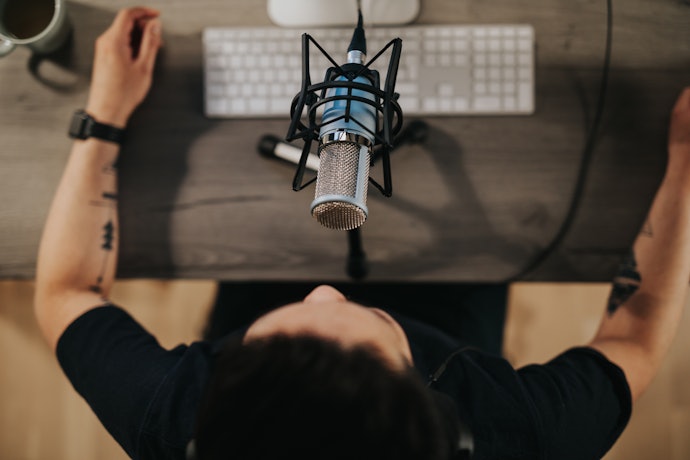
Microphones have several polar patterns or directionalities for different uses.
- Unidirectional - records sound from one direction, specifically, the front of the mic. This is recommended for recording one person's voice or if you'd like to focus on one sound only
- Omnidirectional - captures sound from all around the micーin 360 degrees. This is useful if you have multiple speakers
- Cardioid - captures sound well at the front and sides, but not at the back. This is best for live vocals or drums, where you have to catch concentrated sounds
Note, however, that you may record unwanted sounds with omnidirectional and cardioid types since they don't focus on recording in one specific direction.
Piece of trivia: the term "bleeding" is used when you receive unwanted audio or sounds.
Know the Frequency Response to Determine the Range: 20 Hz to 20 kHz for Versatility

The consistency of the soundwaves that the microphone can capture depends on how high or low the frequency is. A microphone with a range of 20 Hz to 20 kHz is recommended for any purpose, and 80 Hz to 15 kHz frequency response is enough if you’ll just use it for recording song covers or original songs.
Trivia: the normal frequency that we humans hear or feel is 20 Hertz, and the lowest is 12 Hertz.
Go for a Sample Rate of at Least 44.1 kHz for Clarity of Sound

The sample indicates the sound quality sent by the microphone. A microphone should have at least a 44.1 kHz sample rate. If it's higher, for instance, 96 kHz, then the microphone will most likely capture and produce high-quality sounds that are almost the same as your raw voice.
44.1 kHz is indeed the best audio quality format for consumer audio.
Pick-Up Range Indicates the Mic's Distance Range: 6 to 12 Inches Is Optimal

You should also get a microphone that can capture sounds even from a distance. The pick-up range will determine how far the microphone detects and captures sound clearly. Recording sound from about 6-12 inches away is optimal. However, catching sounds at longer distances also means capturing unwanted noise, wind, or traffic.
This is where the polar pattern of the microphone is important to get quality audio and avoid audio bleeding.
Choose the Format That Suits Your Needs

For the format of the mic, you should determine which type is right for you. A lapel, handheld, or stand type are among the following you can choose from. A lapel or handheld one would be useful if the speaker needs to move around, whereas a stand type is preferable for talks that will just be recorded sitting down.
Fixed stands simply need to be put on top of your desk. It can be adjusted at your desired angle. Some stands, however, need to be mounted on a desk or wall using screws, which can take some time to be assembled.
When using wireless microphones, you should first check the best frequency that the wireless mic will use so that there will be no radio interference from other sources using the same frequency.
Look for Features That Add More Value Like Headphone Outputs, Adjustable Echo and Volume Settings, and More

There are USB microphones that offer unique features that can improve your recording experience. Below are some features you might want to look for:
- Headphone outputs - allow you to perform better because you can hear instrumentals clearly. You can also hear yourself when recording during talks or podcasts
- Adjustable echo and volume settings - make your recording process more comfortable because you can set them according to your preference or needs
- Mute control buttons - easier and faster to access instead of turning off the microphone entirely
- Windproof feature - works great if you need your records to have clean and wind-free audio. This is also recommended if you’ll use your USB microphone outdoors
Pop filters are used to filter wind on the microphone. Proper equalization can also lessen the effects of wind on your recording.
10 Best USB Microphones to Buy Online
| Products | Image | Click to purchase | Popularity | Details | ||||||
|---|---|---|---|---|---|---|---|---|---|---|
Type | Directionality | Frequency Response | Sample Rate | Format | Additional Features | |||||
1 | Seiren Mini - Ultra-Compact USB Microphone |V3 Razer |  | No.1 | Condenser | Supercardioid | 20–20000 Hz | 96 kHz | Stand | Tap-to-Mute Sensor With LED, Desktop Stand | |
2 | RGB USB Microphone |AU-PM461TR/PM461S/PM461TR Maono |  | No.2 | Condenser | Cadioid | 20–20000 Hz | 192 kHz, 24-bit | Stand | RGB Lighting on TR Model, Gain Knob, Tripod Stand | |
3 | USB Condenser Premium Microphone and Digital Mixing Solution for Streaming |WAVE 3 ELGATO |  | No.3 | Condenser | Cadioid | 70–20000 Hz | 48 kHz, 96 kHz | Stand | Clipguard, Capacitive Mute, Headphone Monitoring, Wave Link App | |
4 | USB Microphone|DGM20/DGM20S Maono |  | No.4 | Condenser | Cadioid | 50–20000 Hz, 80–10000 Hz | 48 kHz, 24-bit | Stand | RGB Light, Noise Reduction, Headphone Monitoring, Gain Control | |
5 | Condenser Microphone RGB USB |K3 BOYA |  | No.5 | Condenser | Supercardioid | 20–20000 Hz | 48 kHz | Stand | Smart Rotation Tuning, RGB Colorful Lighting Effect, Direct Headphones Connection | |
6 | USB Desktop Microphone Computer Desktop UGREEN |  | No.6 | Condenser | Omnidirectional | 100–15000 Hz | 16-bit, 48 kHz | Stand | Mute Button, Noise Reduction, Volume Control | |
7 | Color RGB USB Capacitor Wired Gaming Noise Reduction Microphone M830 Onikuma |  | No.7 | Condenser | Cadioid | 50–20000 Hz | 48 kHz | Stand | RGB Lighting, Mute Button, Gain Control, Shock Mount | |
8 | Quantum Stream Studio Quad Pattern Premium USB Microphone for Streaming, Recording and Gaming JBL |  | No.8 | Condenser | Cardioid, Omnidirectional, Stereo, Bi-Directional | 50–16000 Hz | 44.1 kHz, 48 kHz, 96 kHz, 192 kHz | Stand | Tap-to-Mute, RGB VU Meter, Dynamic Compressor, Headphone Monitoring | |
9 | RGB USB Microphone |JI-M10 RAYHAYES |  | No.9 | Condenser | Cadioid | 80–10000 Hz | 48 kHz | Stand | 9 Modes, Mute Function | |
10 | RGB Condenser Microphone Jiditech |  | No.10 | Condenser | Cadioid, Unidirectional | unknown | 8 kHz–48 kHz, 24 bit | Stand | RGB Lighting, Mute Switch, Reverb Knob, Noise Reduction, Headphone Monitoring | |

RazerSeiren Mini - Ultra-Compact USB Microphone | V3
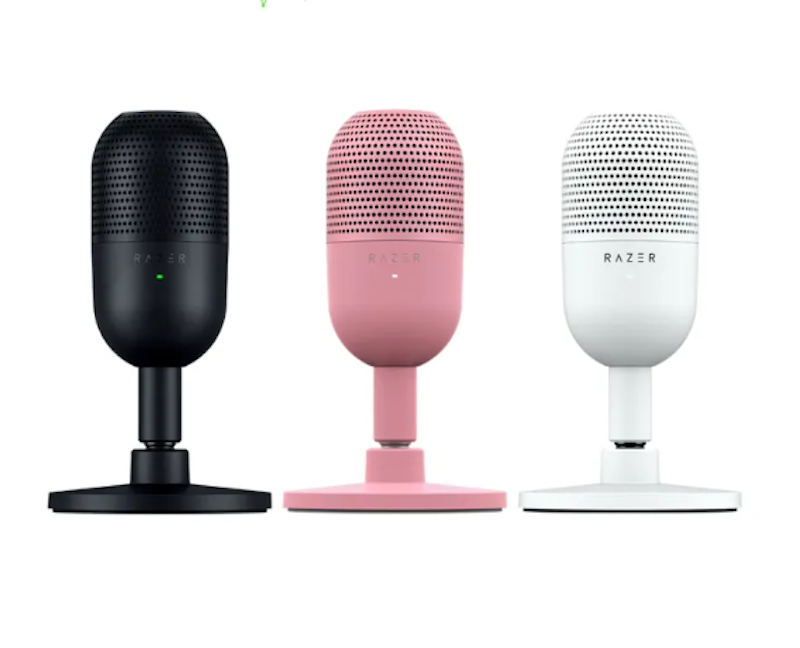
Reviews mention:
Many users praise the microphone for detailed audio with minimal background noise, even without acoustic treatment. Its plug-and-play setup, tap-to-mute button, and adjustable stand offer convenience and save space. Users report excellent vocal clarity on Discord, streams, and calls, often rivaling larger microphones. Some note that manual gain calibration may be necessary for optimal volume due to slightly low default sensitivity.
| Type | Condenser |
|---|---|
| Directionality | Supercardioid |
| Frequency Response | 20–20000 Hz |
| Sample Rate | 96 kHz |
| Format | Stand |
| Additional Features | Tap-to-Mute Sensor With LED, Desktop Stand |
MaonoRGB USB Microphone | AU-PM461TR/PM461S/PM461TR
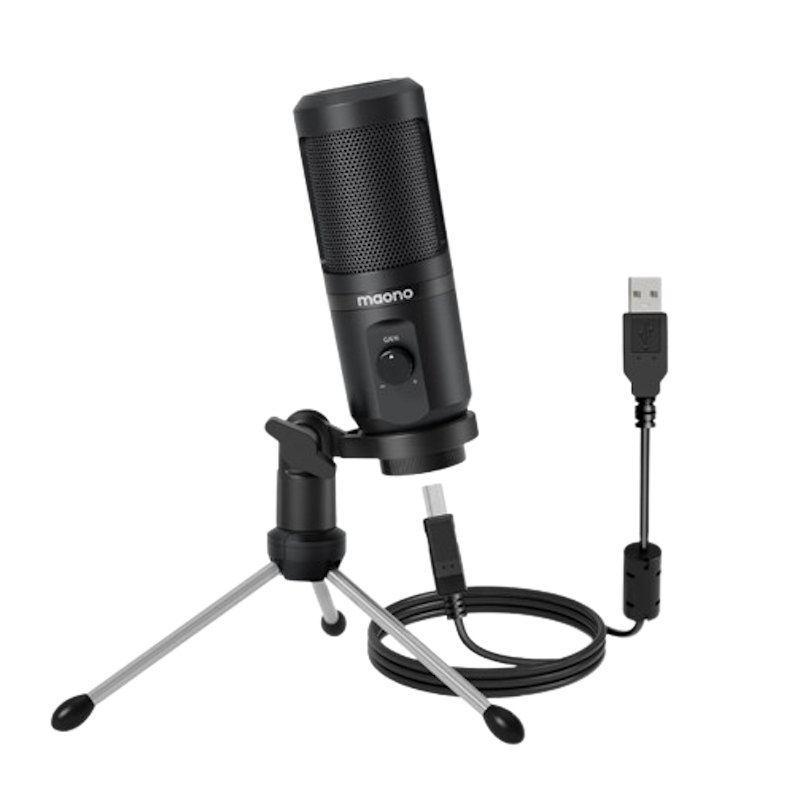
Reviews mention:
Users often highlight the microphone’s excellent sound quality for its price, frequently considering it among the best in its category. It delivers clear, professional audio even at low volumes and is easy to set up with plug-and-play USB connectivity. Many note it is ideal for beginners in streaming or voiceovers, as it captures voice clearly while reducing some background noise. However, its relatively low signal-to-noise ratio of 60 dB may result in a faint hiss in very quiet environments, making it less suitable for noise-sensitive tasks such as instrument tuning.
| Type | Condenser |
|---|---|
| Directionality | Cadioid |
| Frequency Response | 20–20000 Hz |
| Sample Rate | 192 kHz, 24-bit |
| Format | Stand |
| Additional Features | RGB Lighting on TR Model, Gain Knob, Tripod Stand |
ELGATO USB Condenser Premium Microphone and Digital Mixing Solution for Streaming | WAVE 3

Reviews mention:
Buyers note that this condenser microphone delivers professional, natural vocals with minimal background noise due to its cardioid pattern and noise shield. Its plug-and-play USB setup allows seamless integration for content creators, including low-latency monitoring and boom arm compatibility. Users highlight strong plosive rejection and effective handling of bump noise, which in some cases surpasses microphones such as the Blue Yeti. However, its limited low-end response below 100 Hz may produce a slightly thin sound for applications that require added warmth.
| Type | Condenser |
|---|---|
| Directionality | Cadioid |
| Frequency Response | 70–20000 Hz |
| Sample Rate | 48 kHz, 96 kHz |
| Format | Stand |
| Additional Features | Clipguard, Capacitive Mute, Headphone Monitoring, Wave Link App |
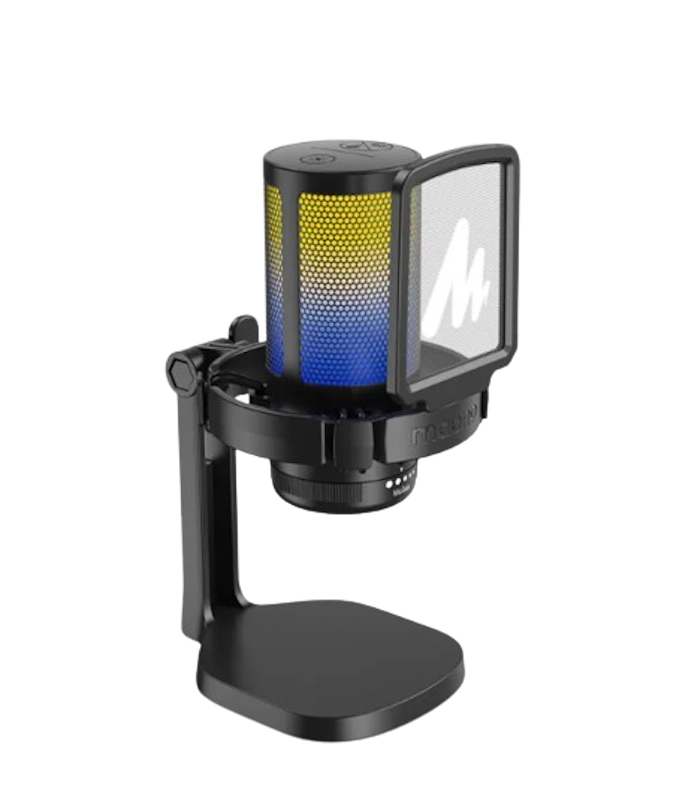
Reviews mention:
Podcasters praise its natural audio making it suitable for YouTube, podcasts, and gaming. Value-added features include one-tap mute, press-and-hold noise cancellation, adjustable gain, customizable RGB lighting, a shock mount, pop filter, and clean USB-C cable management. Users describe the build as sturdy despite some plastic components. Its plug-and-play setup works across devices, though some note slight nasality at a distance or lower volume, suggesting optimal positioning or the use of a boom arm.
| Type | Condenser |
|---|---|
| Directionality | Cadioid |
| Frequency Response | 50–20000 Hz, 80–10000 Hz |
| Sample Rate | 48 kHz, 24-bit |
| Format | Stand |
| Additional Features | RGB Light, Noise Reduction, Headphone Monitoring, Gain Control |
BOYACondenser Microphone RGB USB | K3
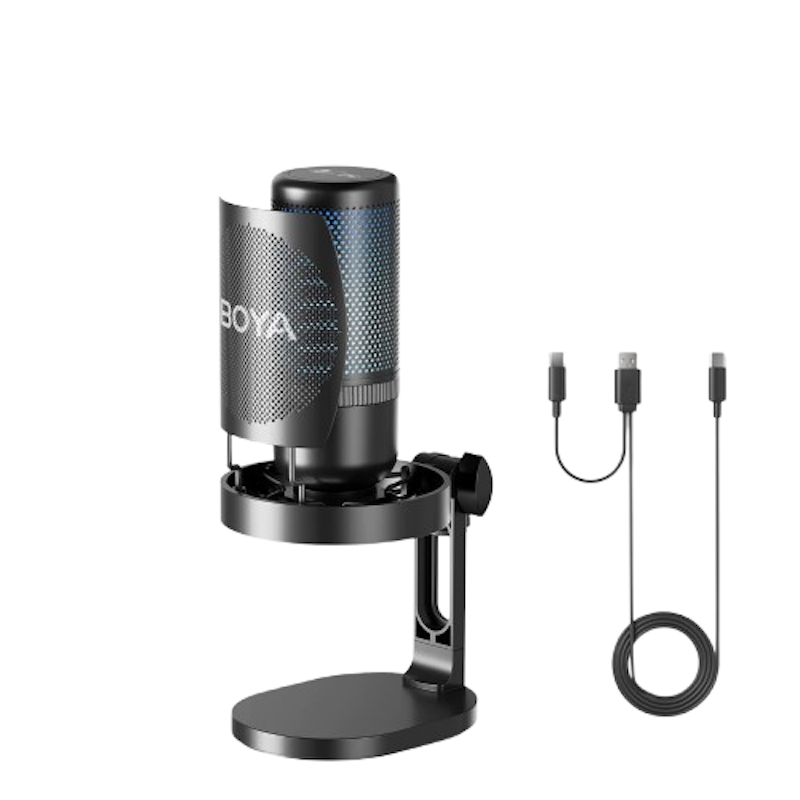
Reviews mention:
Enthusiastic gamers praise the microphone’s sound with 48 kHz/24-bit resolution and 20 Hz–20 kHz frequency response, delivering clear vocals and rich detail for streaming, podcasting, and gaming. Plug-and-play USB-C compatibility, real-time 3.5 mm monitoring, and adjustable gain knob make setup simple across PCs, phones, and other devices. The one-tap noise cancellation functions as an aggressive gate, sometimes cutting audio unnaturally rather than filtering ambient noise effectively.
| Type | Condenser |
|---|---|
| Directionality | Supercardioid |
| Frequency Response | 20–20000 Hz |
| Sample Rate | 48 kHz |
| Format | Stand |
| Additional Features | Smart Rotation Tuning, RGB Colorful Lighting Effect, Direct Headphones Connection |
UGREEN USB Desktop Microphone Computer Desktop
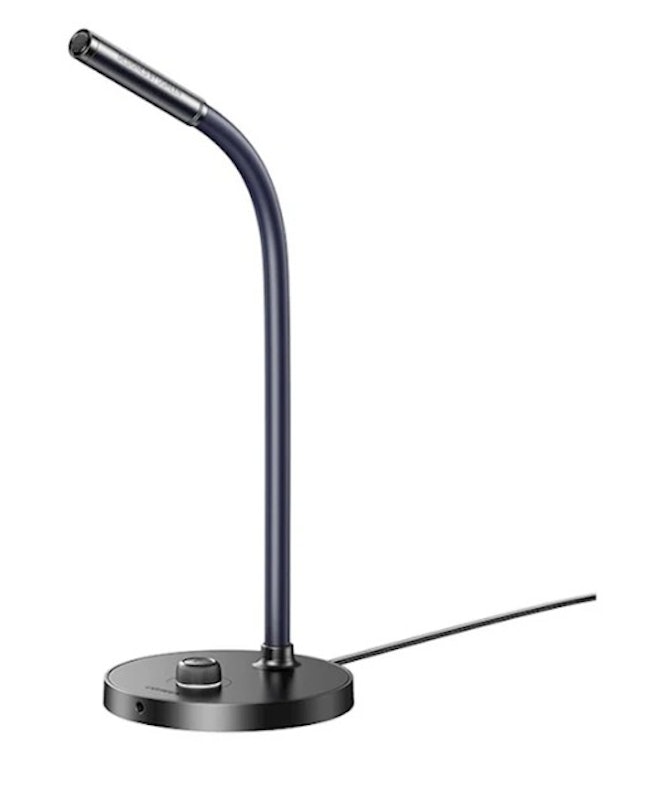
Reviews mention:
Customers often describe the microphone’s omnidirectional pickup, and compatibility with Windows, macOS, and other devices. Reviewers praise its sturdy build, which includes anti-tip silicone pads, an adjustable arm, and quick mute functionality with LED indicators, enhancing desk setups without requiring external drivers. Many note that it delivers clear enough audio for non-professional use. Some users report that the sound can be "tinny" or lacks depth.
| Type | Condenser |
|---|---|
| Directionality | Omnidirectional |
| Frequency Response | 100–15000 Hz |
| Sample Rate | 16-bit, 48 kHz |
| Format | Stand |
| Additional Features | Mute Button, Noise Reduction, Volume Control |
Onikuma Color RGB USB Capacitor Wired Gaming Noise Reduction Microphone M830
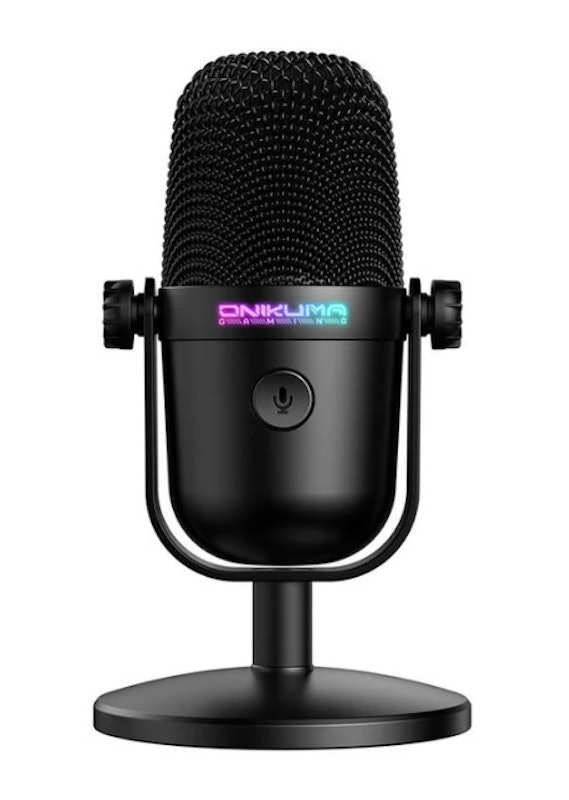
Reviews mention:
The microphone delivers clear, high-definition audio with effective background noise reduction thanks to its cardioid polar pattern, offered at a competitive price under 800 pesos. Additional features such as RGB lighting, one-button mute, independent gain control, and a shock mount enhance its value, particularly for novice users. While the microphone’s positioning is somewhat limited compared with higher-end models, the overall feature set and audio quality provide a strong value proposition.
| Type | Condenser |
|---|---|
| Directionality | Cadioid |
| Frequency Response | 50–20000 Hz |
| Sample Rate | 48 kHz |
| Format | Stand |
| Additional Features | RGB Lighting, Mute Button, Gain Control, Shock Mount |
JBL Quantum Stream Studio Quad Pattern Premium USB Microphone for Streaming, Recording and Gaming

Reviews mention:
Buyers report that the microphone delivers clear, warm sound and outperforms basic models for podcasts, streaming, and recordings. It includes user-friendly features such as versatile mounting options and direct hardware adjustments, reducing reliance on software. The device is reliable across platforms, supports high sample rates up to 192 kHz, and requires minimal setup for beginners. Some users note that noise rejection is limited, which may allow background sounds or vibrations in quiet environments.
| Type | Condenser |
|---|---|
| Directionality | Cardioid, Omnidirectional, Stereo, Bi-Directional |
| Frequency Response | 50–16000 Hz |
| Sample Rate | 44.1 kHz, 48 kHz, 96 kHz, 192 kHz |
| Format | Stand |
| Additional Features | Tap-to-Mute, RGB VU Meter, Dynamic Compressor, Headphone Monitoring |

Reviews mention:
Many shoppers praise the plug-and-play USB setup, which works seamlessly on PC, PS4/5, and Mac without drivers. The cardioid condenser microphone delivers clear, crisp sound. Vibrant RGB lighting (9 modes, toggleable) adds immersive appeal, and the adjustable stand enhances usability. Some users note minor background noise pickup in noisy environments despite suppression features.
| Type | Condenser |
|---|---|
| Directionality | Cadioid |
| Frequency Response | 80–10000 Hz |
| Sample Rate | 48 kHz |
| Format | Stand |
| Additional Features | 9 Modes, Mute Function |
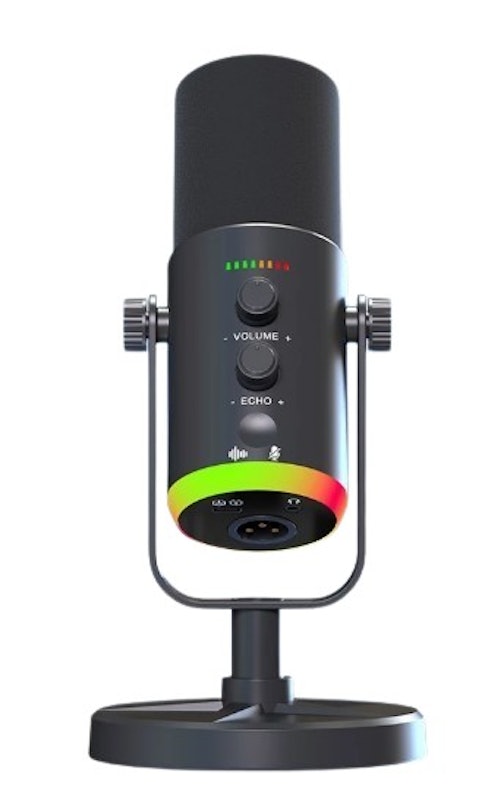
Reviews mention:
Several users appreciate the microphone’s effective noise reduction, which filters environmental sounds even near roads or with background activity. It delivers clear, studio-grade vocals with strong sensitivity across high and low notes. Many highlight its hassle-free setup, solid build quality, and RGB indicators that show operational status, making it suitable for live streaming, gaming, and content creation. Some note that, like most condenser microphones, it can pick up ambient noise if not positioned closely.
| Type | Condenser |
|---|---|
| Directionality | Cadioid, Unidirectional |
| Frequency Response | unknown |
| Sample Rate | 8 kHz–48 kHz, 24 bit |
| Format | Stand |
| Additional Features | RGB Lighting, Mute Switch, Reverb Knob, Noise Reduction, Headphone Monitoring |
Expert's Comment About the Top 10 Products
Frequently Asked Questions Answered by Jojo Ariola
Below are some of the most asked questions on the web answered by sound engineer Jojo Ariola.
Are USB Microphones Good for Recording Vocals?
Can I Use Two USB Microphones at the Same Time?
How to Connect USB Microphone to iPhone or Android Phone?
To connect your USB microphone to an Android phone, you simply need to plug in an OTG adaptor to the USB and your phone. Make sure it's compatible with your Android by picking the appropriate type for your phone, whether it's micro-USB or Type C. For iPhone, you would need a Lightning-to-USB adaptor.
You will need adapters so that you can connect your USB microphone to your iPhone or android phone. Just make sure the device can provide 3.3 volts of power. You will need a lighting-to-audio USB for your iPhone and an Android phone OTG adaptor for an android phone—just make sure the OTG device is compatible with your android phone.
Level Up Your Desktop Setup
Immerse yourself in a comfortable desktop setup for a more enjoyable gaming and working experience. Complete your setup with the best items by reading our other articles below.


Author: Roel Pillas Malubay
Re-editor: Beatrice Fajardo
How We Chose and Ranked Our Product Recommendations
Our buying guide was carefully researched and crafted by the mybest team of writers and editors, in collaboration with the expert featured in this article. We used the buying guide as a basis for choosing and ranking the product recommendations, and we looked at reviews and ratings from different E-commerce sites like Lazada, Shopee, and more.
The descriptions of each product are referenced from content available on manufacturer, brand, and e-commerce sites.